Posts

Showing posts with the label Oracle ADF

ADF Filter LOV View Object , af:selectOneChoice Programmatically

Image
Filter LOV and populate selectOneChoice Programmatically In This post, I want to filter LOV View object before loading to the page, 1. I have main.xml as taskflow, frag1.jsff frag2.jsff as fragment and index.jsf as page. 2. drag main.xml taskflow and drop into the index.jsf page als region. 3.there is a employee list in frag1.jsff and employee form in frag2.jsff for editing. 4.with edit button in frag1.jsff we navigate to the frag2.jsff . 5. drag a af:selectonechoice component and drop into the frag2.jsff . 6. set #{bindings.DepartmentId.inputValue} as value and #{pageFlowScope.EmployeeBean.customList} for the selectItems component. 7.the EmployeeBean managebean is as blow. 8. in Department viewobject there is viewceriteria that I initialse bind variabale and apply viewceriteria with the code, and set the resultl into the lov .
Oracle ADF Composite Primary Key

Image
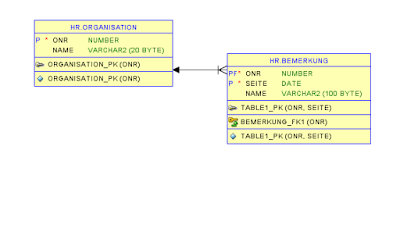
In this Post discuss about Oracle ADF Composite Primary Key Bug, There is a bug in Oracle ADF when we have a composite primary key in table and we want to insert into to this column, especially when one of the primary key columns is foreign key , Problem: I made a sample for this problem. 1. We have two Table Organisation for Master Table and Bemerkung for Detail Table,(Master-Detail) 2. also there are two pages with one task flow. 3. In The Master page, there is a form for organization and table for bemerkung. via Edit button we go to the Detail page for edit the Bemerkung(Detail) 4.after click to Edit button we go to the Detail page. In this, via + Button we want to Insert into Bemerkung. Here Onr and Seite is Composite primary Key, 5.After insert automatically onr set with number becauase is master and get form master . 6. So we Enter the data for Seite and Name column. 7. After commit we see Exception like this two pic...

Oracle ADF Table colspan

Image
How can we use colspan in Oracle ADF Table Component: 1. I change the query of department as below: 2.Create View Object from above Query, 3.Drag and drop as read only table in jsf page. 4.set render for the column that we want to show as colspan 5. set ColSpan when inx is 0 then colSpan 5(because we have 5 column) and  when inx is 1 then colSpan 1(show as normally). 6. After run application.